Transfer your vinyl records and tapes to CD and MP3

If you need help connecting up your turntable or tape deck, click here.

Take a look at our quick start guide, to get a feel for how the software actually works.


Keep abreast of VinylStudio newsVinylStudio is software purpose-built to digitize records and tapes. It can:

  • record your LPs and tapes
  • split them into tracks
  • look up track listings and album art over the Internet
  • remove clicks, hiss, hum and more
  • save your tracks in a wide variety of file formats
  • burn both audio and MP3 CDs and DVDs
  • available for PC and Macintosh
  • makes the job a pleasure rather than a chore

New in Version 7.5:

  • support for WAV, MP3, FLAC, Ogg and WMA files (on the Mac: WAV, MP3, FLAC, Ogg, AIFF, AAC, Apple Lossless and CAF)
  • drag-and-drop album art from your browser
  • play at reduced speed, to find those elusive clicks
  • 'mix down to mono' feature for mono material
  • new 'peak recording level' display when recording
  • many other detailed improvements

Wondering how you can rescue precious worn or damaged recordings? VinylStudio can help.

free to try   $29.95


Why Choose VinylStudio?

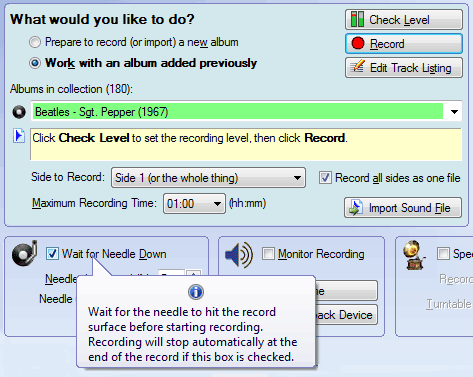
Ease of use: Because it is designed for the job at hand, VinylStudio is much easier (and faster) to use than conventional audio editors.

For example, instead of having to save each track separately, you tell VinylStudio the names of your tracks (or, if you are lucky, look them up), tell it where the trackbreaks are (by dragging markers into position) and then tell it to save your tracks. Hey presto! Job done.

  It is so nice to know that you are ready and willing to take the time to answer questions from those of us who are a bit insecure about how to proceed. I LOVE working with Vinyl Studio, and I learn more with each experiment. You have created a fine product that is very "user friendly."   - David F.

VinylStudio's album list Convenience: Unlike most similar programs, VinylStudio does not expect you to keep track of your recordings manually. Instead, it stores them as a collection, organised by artist and album title.

This means that your recordings are always on hand should you ever need them. And if you need to burn another CD or copy some tracks across to your MP3 player, they're just a couple of mouse-clicks away.

  I think you are selling magic. I am over the moon with my Vinylstudio - so easy!   - Roger S.

Powerful tools: VinylStudio's audio cleanup tools are not just a toy. They are extremely effective at removing clicks and scratches from your recordings. VinylStudio also has a complete set of noise reduction filters:

And if any of your recordings are in really bad shape, you might appreciate our unique Patch feature, which can repair damage that other programs simply cannot touch.  More samples
Remove clicks from vinyl recordings

  VinylStudio's user interface is so simple and straightforward to use and the help function is really good. As for technical support it has been the best I have ever received from any software company in terms of advice and speed of response.   - Richard C.

Want to Know More?
Take a look at some screenshots (which contain more information) Browse the help file supplied with the software
Listen to some more sound samples
Thinking of buying a USB turntable?

Check out Knowzy's Guide to USB Turntables. before you buy. If you already have a (conventional) turntable, consider the NAD PP-3, which is supplied with a Lite version of VinylStudio as standard (alternatives exist). This is probably a better way to spend your money.

Checkout:

Sound Samples

  Holst - The Planets

  Arthur Hall - Tomorrow

More samples

Software and website Copyright AlpineSoft, 2010.