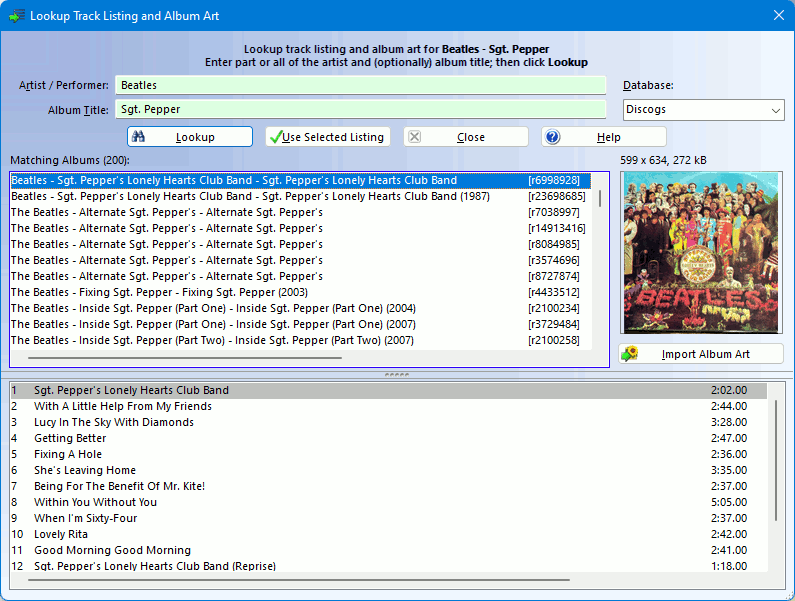

VinylStudio can look up track listings for many LPs over the Internet. To do this, click on the Split Tracks tab, select the album from the dropdown list if necessary and then click Lookup Track Listing. This will popup the following window:
With luck, you will be able to retrieve a full track listing from one or other of the available databases by clicking Lookup. If so, select the best match and then click Use Selected Listing.
If you can't find a match, try simplifying the artist or album title - just a few keywords will often do. Alternatively, you can try a different database. Music Brainz seems to have the best balance between coverage and 'noise', but the other databases are worth a try for more obscure material.
For Discogs, you can also enter the catalog number (without spaces or punctuation) in the Album Artist field, preceded by a #, e.g. #74321589412. Leave the album title blank. You can broaden your search by starting the album artist with a + sign, e.g. +Billy Joel. This can be useful if a search returns no hits. You can also search by Discogs release ID this way, or by enclosing it in square brackets, e.g. [r499497].
Because some entries are for CDs rather than vinyl albums, track listings are sometimes in the wrong order or may contain extra tracks. You can edit an incorrect or incomplete listing as follows:
You can also edit the track listing subsequently in the Split Tracks window. Doing it there has the advantage that you can Undo  () and Redo
  () any changes you make. If the retrieved listing does not contain track times (or if they are inaccurate), it is worth typing them in if you have them to hand, especially for classical music. VinylStudio will then position trackbreak markers for you in roughly the right places.
If you check Auto adjust track breaks then VinylStudio will attempt to align the track breaks with the gaps in the music. Alternatively, you can do this later in the Split Tracks window (Scan For Track Breaks -> Adjust).
VinylStudio can download album art from the Discogs and Music Brainz databases. This is then embedded in the files generated when VinylStudio saves your tracks (but not for WAV files).
To retrieve album art from one of the online databases, lookup the album in the same way as described above. Then click Fetch Album Art to see the cover as a thumbnail, at which point the button changes to Import Album Art. Click this in turn to download the album cover and store it as a file in your recordings folder. Note that you can download album art from one looked-up album and use the track listing from another, even if they come from a different databases. Coverage in Music Brainz is currently rather patchy.
You can also import album art from a file on your hard disk. To do this, select Edit Album Details from the Album menu and click on the 'Album Art' tab. You can also drag album art from most browsers to this tab, or use Copy and Paste.
Some other sites you might try for downloading album art are:
If you use these sites, you will have to save the image to your hard disk and then import it into VinylStudio in the Edit Album Details dialog (or drag the image across from your browser).